Ellicha Script: A Signature Typeface for Modern Digital Branding
I was recently working on a homepage redesign for a ceramics artist’s portfolio site. The goal was to elevate the visual identity from a standard gallery to something that felt curated, personal, and luxurious. The existing sans-serif headline felt too corporate. I needed a typeface that could act as a visual signature, something that whispered elegance rather than shouted it. That’s when I started testing Ellicha Script. Placing it in the hero section, above a serene image of a handcrafted vase, it clicked. The graceful strokes immediately framed the page as an invitation into the artist’s world, not just a catalog of products.
The Personality of Ellicha Script in Digital Space
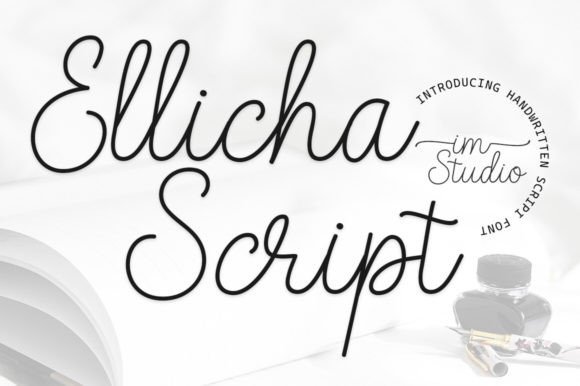
Ellicha Script is a display font designed to emulate the flow and individuality of a personal signature. Its character is distinct: the strokes are stylish and fluid, but they maintain a consistent, refined baseline that makes it surprisingly legible for a script font. Unlike some overly casual handwritten fonts, Ellicha Script carries a mood of sophisticated warmth. It feels modern yet timeless. For web designers, this translates into a powerful tool for establishing tone. When you set a headline or a key phrase in Ellicha Script, it conveys creativity, personal attention, and a premium quality. It’s perfect for brands that want to feel human-centered and artful—think boutique online stores, independent creator portfolios, wellness coaching sites, or luxury product landing pages.
Practical Applications in Web Layouts
After testing it across several live projects, I found Ellicha Script excels in specific digital contexts. Its primary strength is in display typography, where it can create immediate emotional appeal and visual hierarchy.
- Hero Sections & Landing Page Headlines: This is its natural home. The font’s elegance captures attention without overwhelming the supporting imagery or body copy. On a product landing page for a high-end candle brand, using Ellicha Script for the main tagline (“Handcrafted Serenity”) instantly elevated the perceived value.
- Call-to-Action Accents: While not suitable for the entire button text, using Ellicha Script for a single word within a CTA button (like “Shop” or “Download”) on a clean sans-serif background can add a distinctive, clickable charm.
- Section Headings & Feature Titles: On a longer sales page or course website, breaking up sections with headings set in Ellicha Script maintains visual interest and brand consistency. For a blog redesign focused on creative writing, using it for post title graphics helped establish a more editorial, artistic feel.
- Logo Text & Brand Badges: For many small businesses, their website logo might be a simple text treatment. Ellicha Script offers a ready-made, professional signature style that can serve as the core of a digital brand kit.
- Decorative Web Graphics & Banner Text: In promotional banners for seasonal campaigns or overlay text on video backgrounds, the font adds a layer of deliberate styling.
Readability and Responsive Design Considerations
Working with any decorative font in web design requires a thoughtful approach to readability and responsiveness. Ellicha Script, given its clear letterforms, performs well at larger sizes. On desktop, sizes above 48px look stunning. However, the magic of modern web design is in the mobile experience. When testing in responsive previews, I found it crucial to adjust sizes slightly for smaller screens. Maintaining a minimum size of around 32px on mobile ensures the elegant details remain clear and the text doesn’t become a blurry flourish.
Context is key. Over a busy background image, even a large headline can lose legibility. Always ensure sufficient contrast—either by choosing a calm image area for the text overlay or by adding a subtle, semi-transparent background layer behind the text. For dark mode designs or sites with darker themes, the light, airy strokes of Ellicha Script on a dark background can look particularly striking, but again, contrast must be monitored.
Where Ellicha Script Might Not Be the Best Fit
As a specialist display font, Ellicha Script has natural limitations in web UI. It is not designed for, and should not be used for, long body copy. Its decorative nature would severely hinder reading fluency for paragraphs. Avoid using it for critical interface text like navigation menu labels, form field instructions, legal disclaimers, or any dense, informational content. For accessibility-focused designs, relying on it for primary information would create barriers. Its role is aesthetic and tonal, not functional for core content delivery. Similarly, in data-heavy interfaces like dashboards or admin panels, a clean, neutral sans-serif is always the more usable choice.
Strategic Font Pairing for a Cohesive Digital Identity
No font lives alone on a well-designed website. Ellicha Script needs a strong supporting cast. The most effective and common pairing is with a simple, highly readable sans-serif font for all body text, UI elements, and longer descriptions. A font like Inter, Open Sans, or System Sans provides the necessary neutrality and clarity, allowing Ellicha Script to shine as the decorative star without creating visual chaos.
For a more editorial or traditional feel, a classic serif font for body copy can also work, particularly for portfolio sites or brands in the arts, literature, or luxury sectors. This pairing leans into a more classic typographic hierarchy. The rule is simple: let Ellicha Script handle the moments of emotional emphasis, and use a complementary, utilitarian font for everything else. This creates a balanced, professional, and aesthetically cohesive website.
Essential Checks Before Implementing
Before embedding Ellicha Script into a live website or client project, a few practical checks are vital for a smooth implementation.
- Webfont Format & Loading: Confirm the font package includes standard webfont formats (like .woff2). Ensure you or your developer have a plan for loading it efficiently to avoid impacting page speed.
- Licensing for Digital Use: Verify the commercial font license explicitly covers web embedding. Most modern font licenses do, but it’s a crucial step for legal compliance, especially for client work or e-commerce sites.
- Multilingual Support: If your website needs to support characters beyond basic English, check the font’s character set. Many beautiful script fonts lack extended language support.
- Alternates & Swashes: Explore if the font includes alternate characters or swashes. These can be useful for creating unique logo treatments or adding extra decorative flair to a single, key headline, but they require additional CSS or design software knowledge to implement on the web.
In the end, my experience with Ellicha Script on that ceramics portfolio site was a success. It transformed a functional layout into a branded experience. The client noted how the new design felt uniquely “them.” That’s the power of a well-chosen display font in web design: it’s not just decoration; it’s a direct channel for brand personality. Ellicha Script, with its signature elegance, offers a straightforward path to that sophisticated, human-centered digital aesthetic so many modern brands seek.